WEB应用及其部署文件
板桥里人 http://www.jdon.com 2002/06/30
EJB建立部署完毕后,需要应用程序去调用EJB,在Interest例子中,是使用Web应用去调用:
1.home.html 表单
|
<!DOCTYPE html PUBLIC "-//W3C//DTD HTML 4.01
Transitional//EN">
<html>
<head>
<title>
Interest EJB Form
</title>
</head>
<body>
<h1>Interest EJB Form</h1>
//提交form后, 调用InterestServlet
<form action="InterestServlet" method="POST"
>
<table cellspacing="2" cellpadding="2"
border="0">
<tr>
<td>
Principal:
</td>
<td>
<input type="text" name="principal"
value="1000">
</td>
</tr>
<tr>
<td>
Rate(%):
</td>
<td>
<input type="text" name="rate"
value="10">
</td>
</tr>
<tr>
<td>
Periods:
</td>
<td>
<input type="text" name="periods"
value="2">
</td>
</tr>
<tr>
<td>
<input type="submit" name="Calculate"
value="Calculate">
</td>
<td>
<input type="Reset">
</td>
</tr>
</table>
</form>
</body>
</html>
|
2.InterestServlet
| package org.jboss.docs.interest;
import java.io.IOException;
import java.io.PrintWriter;
import java.util.Hashtable;
import javax.naming.InitialContext;
import javax.rmi.PortableRemoteObject;
import javax.servlet.ServletException;
import javax.servlet.http.HttpServlet;
import javax.servlet.http.HttpServletRequest;
import javax.servlet.http.HttpServletResponse;
import org.jboss.docs.interest.Interest;
import org.jboss.docs.interest.InterestHome;
/**
* This Servlet provides a user interface to an Enterprise
Java Bean.
* The example EJB described in the jBoss documentation
at
* http://jboss.org/ calculates compound interest.
* This servlet will call the Interest EJB, passing it
a few
* parameters. The EJB will return a result, which the
servlet
* will display to the Web client.
*/
public class InterestServlet extends HttpServlet
{
private InterestHome interestHome = null;
/** Looks up the InterestHome interface and saves
it for use in
doGet().
*/
public void init() throws ServletException
{
try
{
//下面开始调用EJB
// Get a naming context 首先定义一个naming context
InitialContext jndiContext = new InitialContext();
// Get a reference to the Interest Bean 通过JNDI寻找到EJB
//这里JNDI将 通过jboss.xml获得EJB
Object ref = jndiContext.lookup("java:comp/env/ejb/Interest");
// Get a reference from this to the Bean's Home
interface
//获得一个远程的EJB EJB2.0里,这里可优化成调用本地EJB
interestHome = (InterestHome) PortableRemoteObject.narrow(ref,
InterestHome.class);
}
catch(Exception e)
{
throw new ServletException("Failed to lookup
java:comp/env/ejb/Interest", e);
}
}
/**
*/
public void doPost(HttpServletRequest request, HttpServletResponse
response)
throws ServletException, IOException
{
String title = "Servlet interface to EJB";
double principal = getValue("principal",
1000.0, request);
double rate = getValue("rate", 10.0, request);
double periods = getValue("periods", 2.0,
request);
// set content type and other response header fields
first
response.setContentType("text/html");
// then write the data of the response
PrintWriter out = response.getWriter();
out.println("<HTML><HEAD><TITLE>");
out.println(title);
out.println("</TITLE></HEAD><BODY>");
out.println("<H1>" + title + "</H1>");
out.println("<H2>Calling EJB...</H2>");
//以上是定义html输出
try
{
// Create an Interest object from the Home interface
Interest bean = interestHome.create();
out.print("Interest on "+principal);
out.print(" units, at "+rate);
out.print("% per period, compounded over "+periods);
out.println(" periods is: ");
// call the calculateCompoundInterest() method
to do the calculation
out.println(bean.calculateCompoundInterest(principal,
rate/100, periods));
bean.remove();
}
catch(Exception e)
{
out.println(e.toString());
}
finally
{
out.println("</BODY></HTML>");
out.close();
}
}
private double getValue(String name, double defaultValue,
HttpServletRequest request)
{
double value = defaultValue;
String pvalue = request.getParameter(name);
if( pvalue != null )
{
try
{
value = Double.valueOf(pvalue).doubleValue();
}
catch(NumberFormatException e)
{
}
}
return value;
}
}
|
3.web.xml Web应用的配置文件
本例的web.xml是
|
<?xml version="1.0" encoding="ISO-8859-1"?>
<!DOCTYPE web-app PUBLIC "-//Sun Microsystems,
Inc.//DTD Web Application 2.2//EN" "http://java.sun.com/j2ee/dtds/web-app_2_2.dtd">
<web-app>
<!-- ### Servlets -->
<servlet>
<servlet-name>InterestServlet</servlet-name>
//实际servlet程序
<servlet-class>org.jboss.docs.interest.InterestServlet</servlet-class>
</servlet>
//定义servlet和url的对应关系
<servlet-mapping>
<servlet-name>InterestServlet</servlet-name>
//在form中的action就是此处的 InterestServlet
<url-pattern>/InterestServlet</url-pattern>
</servlet-mapping>
//可以定义首页的文件名 如index.html
<welcome-file-list>
<welcome-file>home.html</welcome-file>
</welcome-file-list>
<!-- ### EJB References (java:comp/env/ejb) -->
//上面servlet有句
// Object ref = jndiContext.lookup("java:comp/env/ejb/Interest");
//这里是ejb/Interest 注意与JBoss中的jndi-name 的区别
<ejb-ref>
<ejb-ref-name>ejb/Interest</ejb-ref-name>
<ejb-ref-type>Session</ejb-ref-type>
<home>org.jboss.docs.interest.InterestHome</home>
<remote>org.jboss.docs.interest.Interest</remote>
</ejb-ref>
</web-app>
|
一般Web.xml基本可以包括部署web应用的各个方面,但是一个问题是,不能加入具体J2EE服务器软件产品的特定配置信息.这就需要JBoss-web.xml
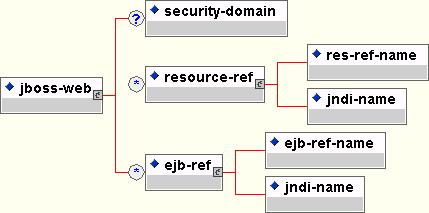
上图基本描述了JBoss-web.xml的内容组成.
在上面的web.xml中 已经定义一个ejb-ref 其中ejb-ref-name是ejb/Interest
那么需要在JBoss中,将ejb-ref-name和jndi-name梆定.看看本例中的JBoss-web.xml
| <?xml version="1.0" encoding="UTF-8"?>
<jboss-web>
<ejb-ref>
<ejb-ref-name>ejb/Interest</ejb-ref-name>
<jndi-name>interest/Interest</jndi-name>
</ejb-ref>
</jboss-web>
|
注意Web.xml中ejb-ref有两种类型:internal(内部) 和external(外部)
internal(内部): Servlet和Ejb是被物理的(实实在在的)封装在一个ear包中.你必须提供一个<ejb-link>,
它的值必须匹配对应EJB的<ejb-name>的值. 这样,你就不必使用jboss-web.xml 配置文件了,没有这个jboss-web.xml也没有关系.
这种情况仅仅工作在缺省的梆定情况,所谓缺省的梆定情况在上节中提到:
"JNDI name将使用在ejb-jar.xml中<ejb-name>XXX</ejb-name>中的XXX来使用EJB的home
interface. "
external(外部):如果EJB在另外一个应用系统单元:也就是说可能部署在另外一台服务器上,或者就是在同一个应用系统单元,但是一个非缺省的梆定情况.
本例中是使用external方式.具体这两个方式详细描述见 http://www.jboss.org/online-manual/HTML/ch07s22.html
|